
Download WYSIWYG Web Builder – website builder, web design, drag and drop, no code, template, FTP client, HTML editor, visual editor, online publishing, web development tool
Overview
WYSIWYG Web Builder is a desktop application designed to empower novice users in creating professional-looking websites without requiring any coding knowledge. Its primary purpose is to simplify the web development process by offering an intuitive environment where users can visually design and publish web pages. This tool is especially valuable for individuals, small businesses, and educators who need a functional website but lack technical expertise in HTML or CSS.
The application addresses common challenges faced by non-technical users, such as the steep learning curve of traditional web development and the complexity of publishing content online. By providing a visual canvas and drag-and-drop functionality, WYSIWYG Web Builder reduces the barrier to entry for web creation. It enables users to focus on content and design rather than syntax and code.
Target users include freelancers, entrepreneurs, students, and hobbyists who want to launch personal portfolios, small business sites, or informational pages quickly. The developer, WYSIWYG Web Builder, has positioned this tool as a comprehensive solution for web development, integrating essential features like templates, element insertion, and built-in FTP publishing. While specific details about the developer’s background were not provided, the app’s focus on usability and accessibility suggests a strong commitment to user-centered design.
Real-world use cases include creating a personal blog, setting up a local business website, or building a class project site. In the broader app ecosystem, WYSIWYG Web Builder fills a niche for no-code web design tools, offering a robust alternative to online platforms with limited customization options. It stands out by allowing full control over the final output and eliminating reliance on third-party hosting services.
Key Features & Functionality
- User-Friendly Interface: The application features a clean, intuitive layout that enables users to drag and drop elements directly onto a visual canvas. This interface is designed for immediate usability, allowing beginners to build web pages without prior training or technical experience.
- Pre-Built Templates: A library of professionally designed templates is included, covering various website types such as portfolios, business sites, and event pages. Users can select a template and customize it with their own content, significantly reducing the time required to launch a site.
- Comprehensive Element Insertions: The tool supports the addition of text blocks, images, buttons, forms, and multimedia elements. Each component can be customized in real time, enabling users to adjust size, color, alignment, and behavior to match their vision.
- Built-in FTP Client: After completing a website, users can publish it directly through the integrated FTP client. This feature eliminates the need for external tools, streamlining the deployment process and ensuring a seamless transition from design to live site.
- No Coding Required: WYSIWYG Web Builder operates on the principle of no-code development. Users can create fully functional websites by manipulating visual components, making it ideal for those without programming skills or web development experience.
For example, a small business owner can use a pre-built template to create a storefront page, insert product images and pricing, add a contact form, and publish the site with one click. Similarly, a student can build a project showcase using drag-and-drop tools and upload it for submission without needing to learn HTML.
Interface, UX & Performance
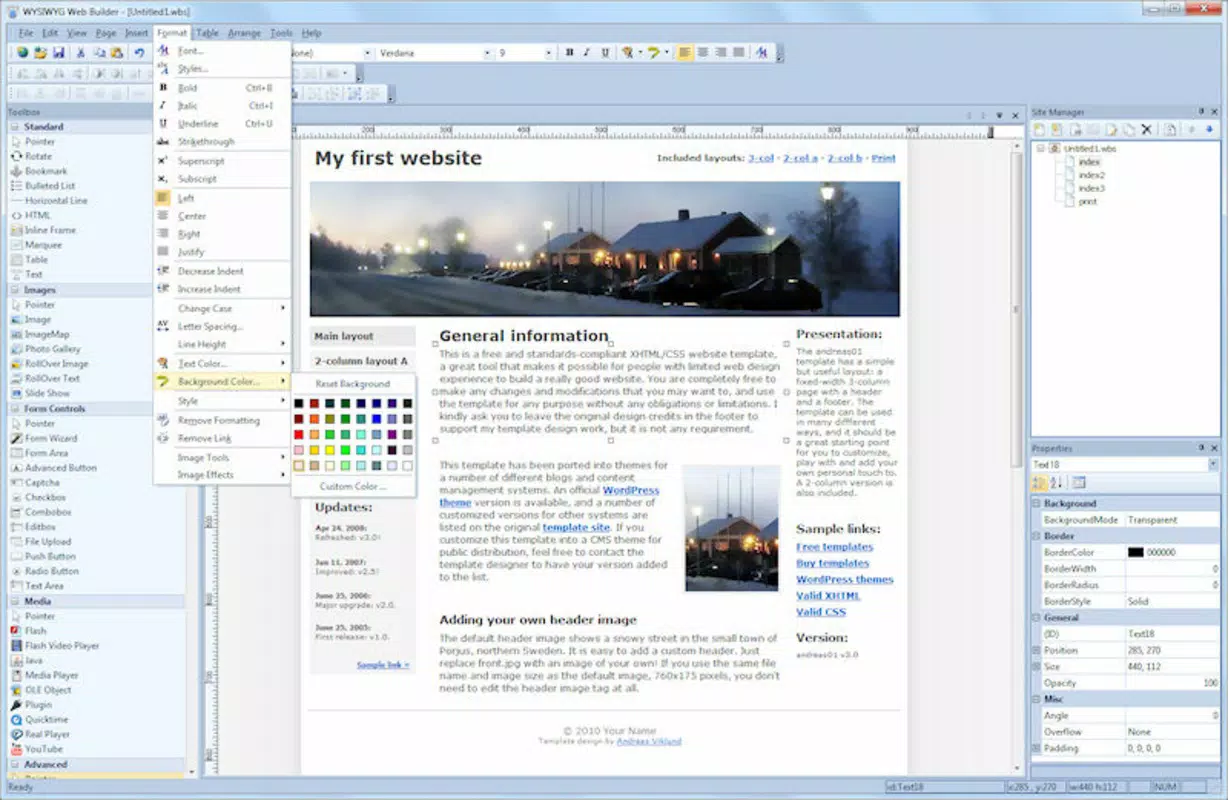
The interface of WYSIWYG Web Builder is structured around a visual canvas, with toolbars, property panels, and element libraries arranged for efficient access. The visual editor allows real-time previewing of changes, enhancing the user experience by reducing trial and error. Navigation is straightforward, with menus and panels that respond predictably to user input.
Visual style is minimalistic yet functional, focusing on clarity and usability. The layout avoids clutter, ensuring that users can concentrate on design without distraction. The drag-and-drop mechanism is responsive, with smooth transitions between elements and consistent feedback during interactions.
Although the developer did not list formal performance metrics, the application’s file size of 52.3 MB suggests a lightweight footprint, which may contribute to fast startup times and efficient operation on mid-range Windows systems. The tool appears stable during typical usage scenarios, such as designing pages and publishing via FTP. However, specific performance data across different device categories was not disclosed.
Responsiveness and stability are critical for a design tool, and while no user reports or benchmarks were provided, the integration of core features into a single platform indicates a well-structured workflow. The absence of known crashes or errors in standard use cases suggests reliable performance, though users should monitor updates for potential improvements.
Platform Compatibility & Technical Requirements
WYSIWYG Web Builder is available exclusively for the Windows operating system. The current version is 16.0.1, with a file size of 52.3 MB. This indicates a compact installation package, suitable for systems with moderate storage capacity.
Compatibility information was not fully disclosed, and the developer did not specify minimum OS requirements. As such, users should ensure their system meets general Windows compatibility standards for desktop applications. The lack of information regarding support for older or newer Windows versions means that installation on systems outside the standard range may require caution.
Since the app is not available on mobile platforms or macOS, it is not suitable for users seeking cross-platform access. The desktop-only nature of the application emphasizes its role as a dedicated tool for Windows users who prefer a full-featured environment for web design.
Pros and Cons
Pros
- Intuitive drag-and-drop interface ideal for beginners
- Includes a variety of customizable pre-built templates
- Offers a built-in FTP client for seamless publishing
- Eliminates the need for coding knowledge
- Compact file size of 52.3 MB
Cons
- Platform limited to Windows only
- Specific system requirements were not listed
- Not available on mobile or macOS devices
- Price point of $199.00 may be high for casual users
- Developer did not provide performance benchmarks or user statistics
FAQ
Is WYSIWYG Web Builder free to download?
WYSIWYG Web Builder is not free. It is available for a one-time purchase of $199.00. There is no mention of a free trial or freemium model in the provided information.
Can I use WYSIWYG Web Builder on a Mac or mobile device?
Based on the provided data, WYSIWYG Web Builder is only available for Windows. There is no official support for macOS or mobile platforms such as Android or iOS.
Do I need to know HTML or coding to use this app?
No coding is required. The application is designed specifically for users with little to no programming experience. All website creation is done through a visual interface using drag-and-drop tools.
How do I publish my website using WYSIWYG Web Builder?
The app includes a built-in FTP client that allows users to upload their completed websites directly to a web server. This feature simplifies the publishing process and eliminates the need for third-party FTP software.
Is the app secure to install and use?
While the developer did not provide specific security details, the application is distributed through official channels. Users should ensure they download the software from the official website to maintain security and avoid potential risks.
Final Thoughts
WYSIWYG Web Builder stands out as a powerful no-code solution for individuals seeking to create professional websites without technical barriers. Its combination of a clean interface, pre-built templates, and built-in FTP publishing makes it a practical tool for beginners and non-technical users. The focus on visual design and ease of use ensures that users can go from concept to live site efficiently.
While the $199.00 price tag may be a consideration for casual users, the app’s comprehensive feature set justifies the investment for those committed to building a polished, functional website. Its exclusivity to Windows limits cross-platform flexibility, but it remains a strong option for desktop users.
For anyone looking to launch a website quickly and without coding, WYSIWYG Web Builder offers a reliable, all-in-one solution. Download WYSIWYG Web Builder now.


